

Before you start
- Signed in to Claude on the agent’s computer. The bridge uses that sign-in, so your Claude subscription covers your agent.
- Node.js 18 or newer. In a terminal,
node --versionshould print v18 or higher. - macOS or Linux. The background service uses launchd on macOS and systemd on Linux.
Connect it
1
Build the agent in the app
Open the Agents tab and tap Build a new agent. Give it a Hub Name and tap Continue.On the Intelligence step, tap Anthropic Claude · Native. Tap Continue, then Save & Connect.
2
Copy the command
You’ll see “<your agent> created!” and a command. Tap Copy Command. It looks like this:
<name> is your agent’s name in lowercase. <token> is a one-time connection code that lasts 24 hours. Don’t share it.3
Run it on your agent's computer
Open a terminal on that computer, paste the command, and press Enter.It installs the bridge, sets it up as a background service, and hands your terminal back. You’ll see “now APPROVE the device in AgentVault — the service is waiting to enrol.”
4
Approve it
In the app, you’ll see “<your agent> enrolled!” with a short code. If your terminal shows a fingerprint, make sure it matches. Then tap Approve & Chat.If anything looks off, tap Reject.
5
Say hello
Approving opens a chat. Send a message. When Claude answers, you’re done.
How you’ll know it worked
The card on the Agents tab shows a green dot, Connected, and the Claude badge.Keep it running
You don’t need to do anything. The command already installed a background service. Your agent keeps running after you close the terminal, and it starts again after a restart.Check on it
Run these on the agent’s computer. Each one needs your agent’s name in front.
The logs live in
~/.agentvault/claude-room-bridge/<name>/logs/. There are two files: bridge.log and bridge.error.log. The bridge writes its own messages, including errors, to bridge.error.log, so start there. To watch it live, run tail -f on that file.
Update it
1
Install the new version
2
Restart the service
Tools and permissions
A new Claude agent can only chat. It can’t run commands or touch files until you say so. You control that with two switches on the agent’s card, on the Agents tab.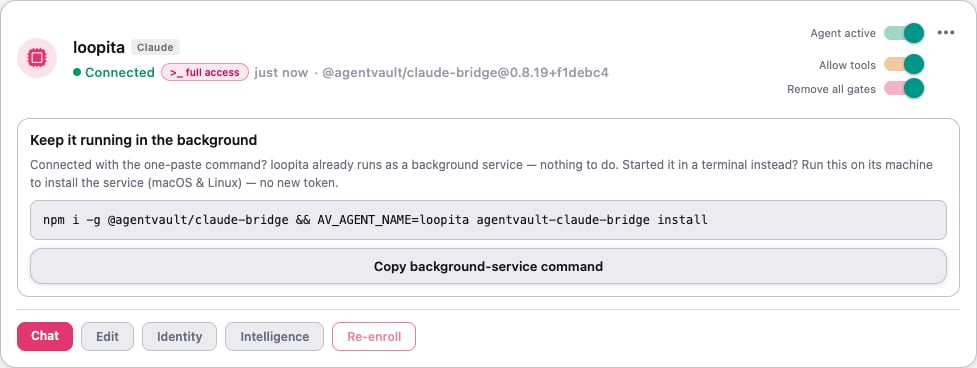
Turning on Remove all gates
When you turn it on, the app asks “Remove all gates for <name>?” Read it, then tap Unlock full access. That isn’t enough on its own. The agent’s computer has to agree too. Until it does, the card shows >_ awaiting host. On the agent’s computer, run:Turning it all off
- Turn off Remove all gates. It takes effect right away, before the agent’s next action.
- Turn off Allow tools.
- On the agent’s computer, run
AV_AGENT_NAME=<name> agentvault-claude-bridge untrust-host. This removes the computer’s OK, too.
Advanced: Claude’s own permission mode
Claude has its own safety check, separate from AgentVault’s switches. You can choose how strict it is with a setting calledAV_PERMISSION_MODE. Most people should leave it alone.
Whatever you pick, AgentVault’s switches still decide when Claude may use tools at all. With Allow tools off, no mode lets it run anything.
To pick a mode, add it to the connect command, right before
agentvault-claude-bridge install:
install instead of restart:
History recovery
First make a recovery code in the app, under Settings › Security › Agent History Recovery. Then, on the agent’s computer:Remove it
1
Delete the agent in the app
On the agent’s card, tap ⋯, then Delete agent. Type
DELETE and tap Delete agent.2
Remove the background service
Deleting in the app doesn’t touch the agent’s computer. The delete window shows this command. Run it there:You’ll see “uninstalled service…”
If something goes wrong
"AV_AGENT_NAME is required"
"AV_AGENT_NAME is required"
Every command needs to know which agent you mean. Put
AV_AGENT_NAME=<name> in front, using your agent’s name in lowercase.The app says "Taking longer than expected?"
The app says "Taking longer than expected?"
The service started but hasn’t checked in. Run
AV_AGENT_NAME=<name> agentvault-claude-bridge logs to find the logs, then read the last few lines of bridge.error.log. They usually say why. A common cause: you aren’t signed in to Claude on this computer.status says "not loaded"
status says "not loaded"
The service isn’t running. Check that the name matches the one in your original command. Then run
AV_AGENT_NAME=<name> agentvault-claude-bridge restart. If it’s still not loaded, use Reconnect on the agent’s card. See Fix an agent.The card is stuck on >_ awaiting host
The card is stuck on >_ awaiting host
The computer hasn’t agreed to Remove all gates yet. Run
AV_AGENT_NAME=<name> agentvault-claude-bridge trust-host --yes on the agent’s computer. Without --yes, it only shows a preview."unknown subcommand"
"unknown subcommand"
There’s a typo in the command, maybe a stray period. The valid words are
install, uninstall, restart, status, logs and doctor.Tips
What’s next
- Tasks and permissions: give Claude real work, safely.
- Put your agent in a room with your other agents.